
What is Prudent?
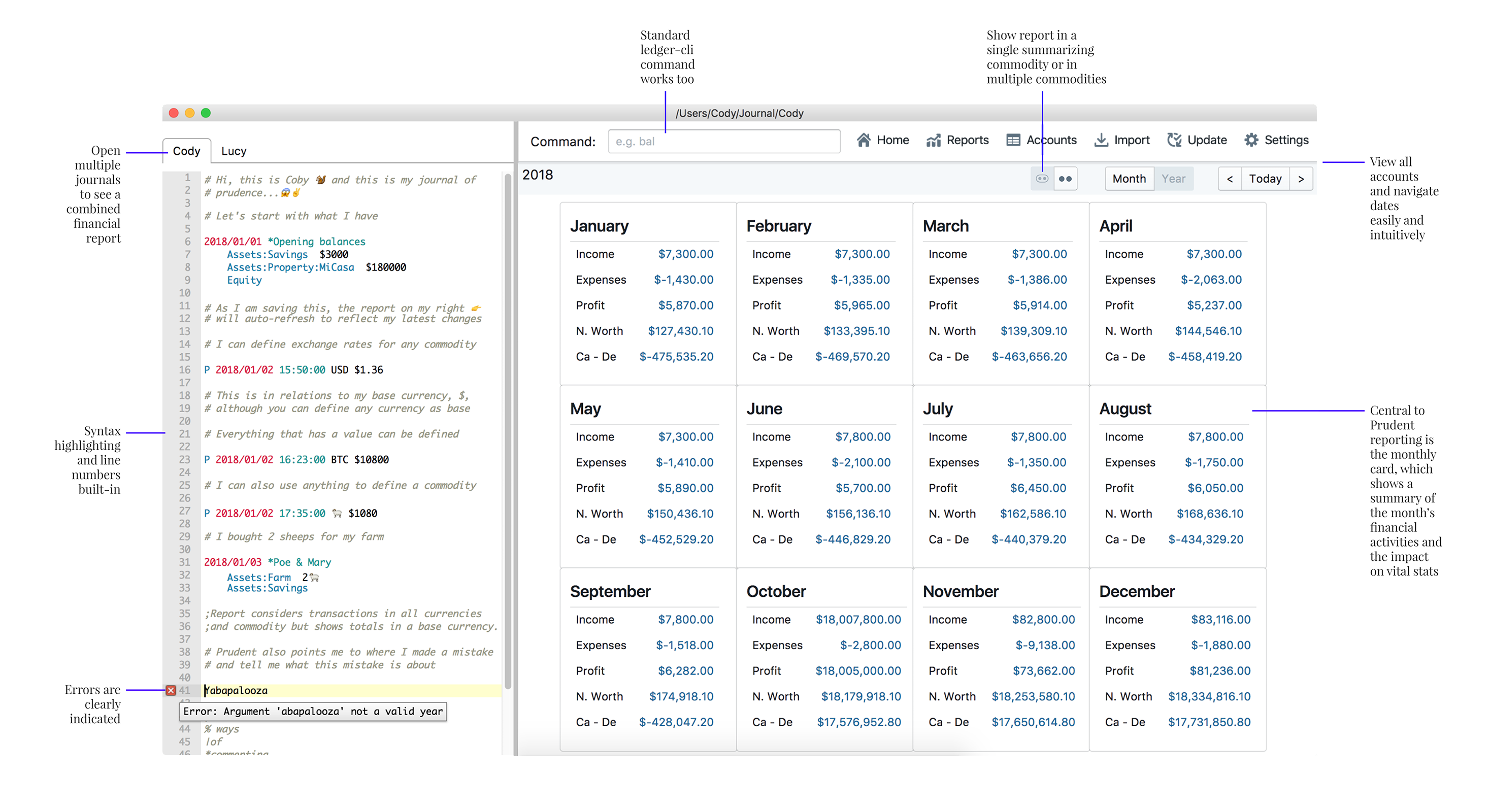
Prudent is an integrated environment that helps you create and update accounting journals of your personal, family or team finances. There's a range of extensions to import transactions and update prices. There are various reports that gives you an encompassing view of your income, expenses, assets, liabilities, net worth and more!
Features
Runs on your computer
Prudent is an application for your computer (currently available for macOS oand Windows) and not a cloud SaaS. This makes it easy to use Prudent along with other tools and operating system features that you’re familiar with. You may want to use Git for version control of your file, encrypt it when not in use and back it up as any other files on your computer. You can also open and create as many Ledger files you want and import transactions into these text files with scripts. These files obviously stays on your computer and you’re in control of whatever privacy setup you desire.
Practical extensions
If you live in Singapore, there's a range of extensions available to import transactions from many banks as well as the CPF. There's also an extension that helps you estimate your property price based on the URA managed Private Residential Property Price Index on Data.gov.sg to provide an indicative price of your property based on overall price movements of property in Singapore (by quarter).
For other countries, there's the QIF and QIF US extension thats currently available or you can develop your own!
The benefit of text, with less of the manual input
If you’re not already familiar with Ledger, you should check it out! Ledger understands transactions and other accounting metadata that are written in a plain text file. This has many advantages. You can edit text files as-is and find backing up a breeze (it’s a text file!). You will always be able to find a plain text editor whenever and wherever you are. Most importantly, you’ll find the approach very flexible to your accounting situation and need.
Prudent aims to make it even easier to work with Ledger text files with integrated reporting and practical features that collectively caters to your accounting needs.
Multi-commodity
Ledger allows the use of any symbol, emoji or word to denote commodities (i.e. shares, currencies and etc.). Prudent makes it even simpler to work with multiple commodities with the commodity summary. View reports that are all converted to a single currency of your choice or reports that show all currencies involved with the commodity switch.
Tree-based accounts
Ledger provides a depth flag to view balances of accounts at differing levels. Prudent takes this further by showing all of your accounts in the form of a tree. You can unravel more details at each level of the tree by simply clicking on the arrows on the left of a parent or branch account. It is hoped that the more tactile approach encourages you to understand your finances better at each level.